ROG Ally vs Steam Deck: Which Handheld Gaming PC Is Better?
Introduction
Handheld gaming has changed dramatically over the last few years. Instead of being limited to small portable consoles with exclusive games, players can now enjoy full PC gaming experiences while traveling, relaxing on the couch, or even during work breaks. Two devices that have completely transformed this market are the ASUS ROG Ally and the Valve Steam Deck. Both offer the ability to play modern PC games in a portable form, but they take different approaches to performance, software, comfort, and overall user experience.
If you are comparing ROG Ally vs Steam Deck, you are probably trying to decide which handheld gaming PC deserves your money. While both systems can run thousands of games, they are designed for different kinds of players. The ROG Ally focuses on delivering high-end performance with Windows support, while the Steam Deck emphasizes simplicity, affordability, and seamless integration with the Steam platform.
Choosing between these handhelds is not as simple as looking at specifications. Display quality, battery life, operating system, comfort, software compatibility, storage options, and gaming habits all play important roles in determining which device fits your needs. In this detailed comparison, we’ll examine every important aspect so you can confidently choose the right handheld gaming console.
Understanding the ROG Ally
The ASUS ROG Ally is a premium handheld gaming PC designed for gamers who want desktop-like performance in a portable device. Unlike traditional gaming consoles, the Ally runs Windows, allowing users to install almost any PC game launcher available today. Steam, Xbox Game Pass, Epic Games Store, Ubisoft Connect, Battle.net, EA App, and many others work directly on the device.
One of the biggest strengths of the ROG Ally is its modern AMD Ryzen Z1 processor lineup. The higher-end Ryzen Z1 Extreme version delivers impressive gaming performance that can rival some entry-level gaming laptops. This powerful hardware allows users to play demanding AAA games with higher frame rates and better graphics settings than many competing handhelds.
The device also targets gamers who enjoy flexibility. Since Windows is installed by default, users can install productivity software, streaming applications, emulators, browsers, editing tools, and almost anything else that runs on a Windows computer. This transforms the handheld from a gaming console into a compact portable PC capable of handling multiple everyday tasks.
Understanding the Steam Deck
Valve introduced the Steam Deck with the goal of making PC gaming more accessible in a handheld format. Rather than using Windows as its primary operating system, the Steam Deck runs SteamOS, a Linux-based operating system optimized specifically for gaming. This creates an experience that feels much closer to using a dedicated gaming console than a traditional computer.
SteamOS is built around simplicity. After powering on the device, users immediately enter the Steam gaming interface without dealing with Windows updates, unnecessary background programs, or desktop distractions. This streamlined approach makes the Steam Deck extremely beginner-friendly, especially for people who mainly purchase games through Steam.
Valve has continuously improved SteamOS through frequent updates. Game compatibility has expanded significantly thanks to Proton, Valve’s compatibility layer that allows many Windows games to run smoothly on Linux. As a result, thousands of popular PC titles now work surprisingly well on the Steam Deck with little or no user configuration.
Design and Build Quality
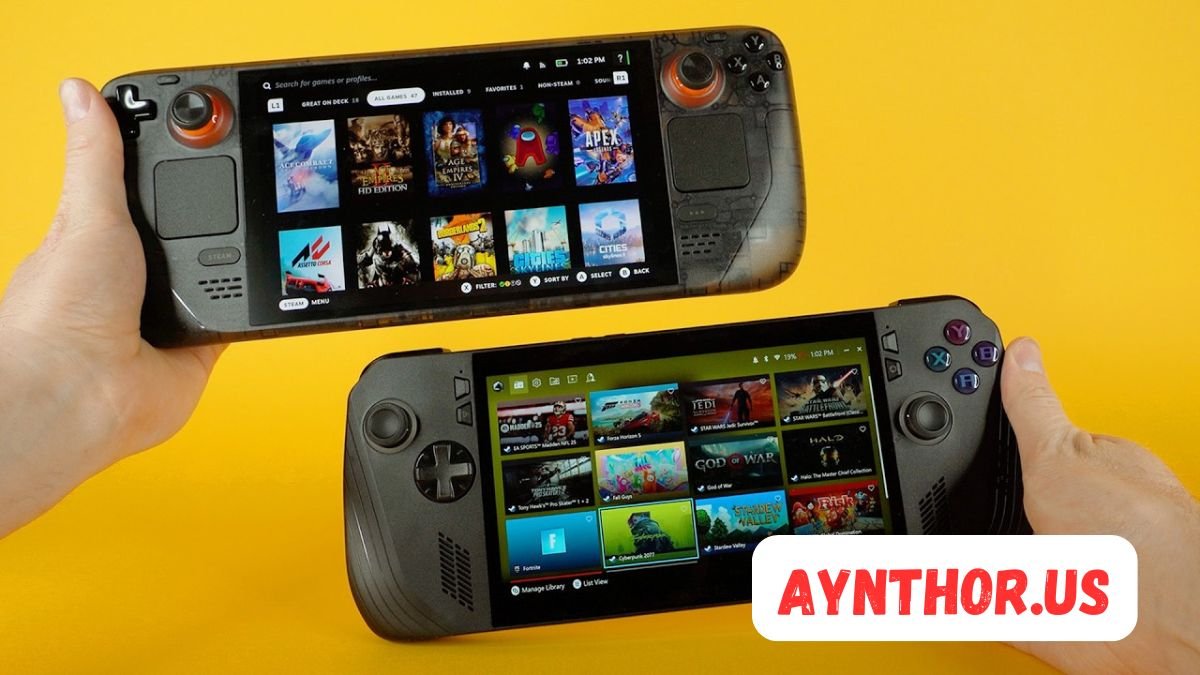
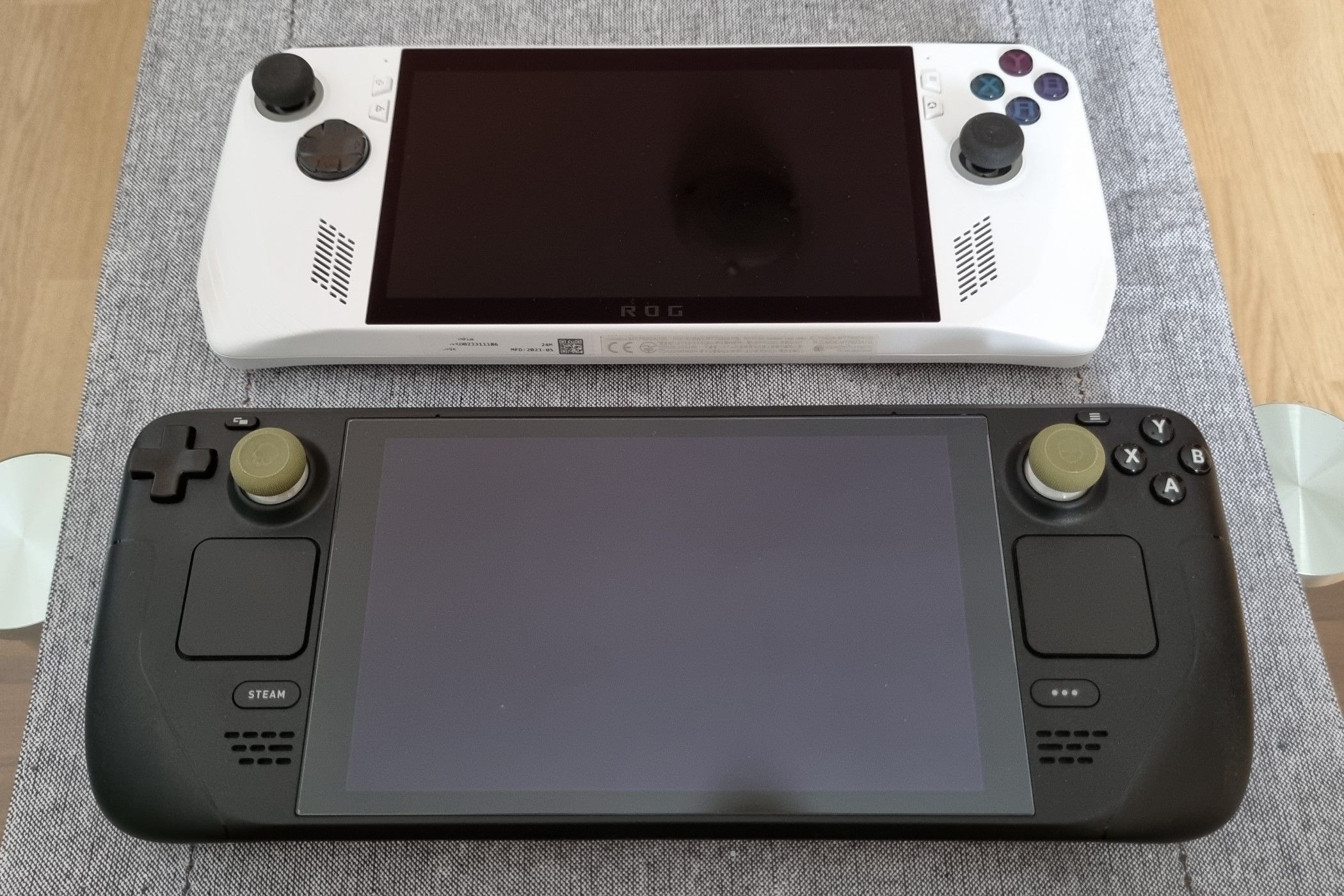
The first thing most buyers notice when comparing ROG Ally vs Steam Deck is their physical design. Although both devices belong to the handheld gaming category, they have noticeably different shapes, sizes, and overall aesthetics.
The ASUS ROG Ally follows a clean white gaming design inspired by the Republic of Gamers brand. Angular lines, RGB lighting around the joysticks, and modern styling give it a futuristic appearance. Despite packing powerful hardware, ASUS has managed to keep the device relatively lightweight, making it comfortable to carry in a backpack or gaming case.
The Steam Deck, on the other hand, adopts a more understated design. Its matte black finish avoids flashy gaming elements, focusing instead on practicality. The grips are larger, the body feels slightly bulkier, and the overall shape is designed to provide maximum comfort during extended gaming sessions. Many users appreciate this ergonomic approach, especially when playing for several hours.
Comfort During Long Gaming Sessions
Comfort becomes increasingly important when using a handheld for multiple hours. Even powerful hardware becomes less enjoyable if the device causes hand fatigue or feels awkward to hold.
The Steam Deck has earned praise for its excellent ergonomics. The larger grips naturally support the palms, reducing strain over long sessions. The weight distribution is also carefully balanced, making the console feel stable rather than front-heavy. Players with larger hands often find the Steam Deck particularly comfortable.
The ROG Ally offers a more compact body, making it easier to transport and slightly lighter overall. While many users find it comfortable, those with larger hands may notice the grips are less substantial than those on the Steam Deck. Nevertheless, ASUS has done an excellent job designing a handheld that feels premium without becoming overly bulky.
Button placement differs slightly between the two devices. The Steam Deck includes additional rear buttons and dual trackpads that expand control options, while the ROG Ally focuses on a more traditional controller layout familiar to Xbox users. Both approaches have advantages depending on the games you play most frequently.
Display Comparison
The display is one of the most noticeable differences when discussing ROG Ally vs Steam Deck. Screen quality directly affects immersion, visual clarity, and overall gaming enjoyment.
The ASUS ROG Ally features a vibrant Full HD 1080p display with a smooth 120Hz refresh rate. This higher resolution produces sharper images, while the faster refresh rate allows games and menus to feel incredibly fluid. Competitive gamers who enjoy fast-paced shooters, racing games, or action titles immediately notice the smoother animation.
Brightness is another area where the Ally performs well. Outdoor visibility is improved, colors appear vibrant, and the overall image quality feels modern. The display also supports variable refresh rate technology, reducing screen tearing and making gameplay smoother when frame rates fluctuate.
The Steam Deck features a lower-resolution display with a 60Hz refresh rate on the original LCD model, while the OLED version introduces significant improvements in brightness, contrast, color accuracy, and battery efficiency. Although it does not match the Ally’s refresh rate, the OLED screen delivers deep blacks and outstanding image quality that many players love.
Ultimately, gamers prioritizing resolution and refresh rate often prefer the Ally, while those seeking richer colors and better contrast may lean toward the Steam Deck OLED.
Performance and Hardware
Performance is one of the biggest deciding factors when comparing these handheld gaming PCs. Both systems use AMD processors, but their capabilities differ considerably.
The ROG Ally equipped with the Ryzen Z1 Extreme processor delivers exceptional gaming performance. Modern AAA games generally achieve higher frame rates, especially when users adjust power profiles appropriately. More graphical headroom allows players to enjoy higher settings while maintaining smooth gameplay.
The Steam Deck uses a custom AMD APU specifically designed for balanced performance and efficiency. Although it cannot consistently match the raw power of the Ally, Valve has optimized SteamOS exceptionally well. Many games perform better than expected because the operating system minimizes unnecessary resource usage.
Cooling systems also contribute to performance consistency. ASUS uses an advanced dual-fan cooling solution that helps maintain lower temperatures under heavy workloads. Effective cooling allows the processor to sustain higher clock speeds without excessive thermal throttling.
Valve’s cooling system focuses on balancing performance with quiet operation. While the Steam Deck may not reach the same performance ceiling as the Ally, it maintains stable gaming experiences across many popular titles while producing relatively low fan noise.
Real-World Gaming Performance
Specifications tell only part of the story. Real-world gaming performance provides a much clearer picture of how each handheld performs during everyday use.
The ROG Ally excels when playing demanding modern games. Titles like Cyberpunk 2077, Starfield, Forza Horizon 5, Elden Ring, and Hogwarts Legacy generally achieve better frame rates than on the Steam Deck, particularly when users lower certain graphical settings while taking advantage of the more powerful processor.
Competitive games also benefit from the Ally’s higher refresh rate display. Games such as Fortnite, Apex Legends, Valorant, Overwatch 2, and Call of Duty feel smoother when frame rates approach the display’s 120Hz capability. Players interested in multiplayer gaming often appreciate this additional responsiveness.
The Steam Deck performs impressively considering its hardware. Thousands of games run comfortably at settings optimized specifically for the device. Valve’s Steam Deck Verified program also helps users identify games that provide the best experience without extensive tweaking. Many indie titles, older AAA games, strategy games, and role-playing games feel perfectly suited to the Deck’s hardware.
Rather than chasing maximum performance numbers, the Steam Deck emphasizes consistency. Stable frame rates and optimized game profiles often produce an experience that feels polished despite using less powerful hardware.
Operating System Experience

Perhaps the largest philosophical difference in the ROG Ally vs Steam Deck comparison comes down to software.
The ROG Ally ships with Windows, making it incredibly versatile. Nearly every PC game launcher is supported immediately. Users can install software exactly as they would on a desktop computer, connect external monitors, use Microsoft Office, browse the internet, edit videos, or even perform work-related tasks.
However, Windows was originally designed for desktops rather than handheld devices. Navigating small menus using joysticks or touch controls occasionally feels less intuitive. ASUS has improved this experience with Armoury Crate SE, providing a console-like launcher that simplifies game management, performance profiles, and system settings.
SteamOS provides a much more console-focused experience. Boot times are fast, updates are streamlined, and the gaming interface feels natural on a handheld display. Players spend less time configuring software and more time playing games. The downside is that certain non-Steam launchers and specialized software may require additional setup or workarounds compared to Windows.
For gamers who enjoy simplicity, SteamOS offers one of the smoothest handheld gaming experiences currently available. For users who want complete freedom and compatibility, Windows on the ROG Ally remains difficult to beat.
Battery Life
Battery life is one of the most discussed topics when comparing the ROG Ally vs Steam Deck. Portable gaming devices rely entirely on their batteries when away from a charger, so understanding how long each handheld lasts is important before making a purchase.
The ROG Ally offers different power modes that directly affect battery performance. Running the device in Turbo Mode delivers excellent gaming performance but drains the battery much faster. On demanding AAA games, users may only get around one to two hours of gameplay depending on brightness, game settings, and processor usage. Switching to Performance or Silent Mode can extend battery life considerably when playing lighter games.
The Steam Deck generally performs better in battery efficiency because SteamOS is optimized specifically for the hardware. Valve also gives players several tools to limit frame rates, adjust refresh rates, and reduce power consumption. Indie games, older PC titles, and less demanding releases can often run for several hours before the battery needs charging. The Steam Deck OLED improves efficiency even further, making it one of the better handheld gaming devices for longer gaming sessions.
Neither handheld is perfect when playing graphically demanding games. Both benefit greatly from carrying a high-capacity USB-C power bank or charging while playing at home. For travelers who spend long periods away from outlets, battery management becomes an important part of the overall experience.
Charging Speed
Charging speed is another factor that influences daily convenience. A device that recharges quickly allows players to return to gaming without waiting for extended periods.
The ASUS ROG Ally supports fast charging, allowing the battery to recover a significant percentage in a relatively short time. This is particularly useful for gamers who have limited gaming windows throughout the day. Even a brief charging session before leaving home can provide enough battery for another gaming session.
The Steam Deck also supports USB-C charging and performs reliably with compatible chargers. Although charging speeds vary depending on the charger being used, Valve designed the system to recharge efficiently while maintaining battery health over time.
Many users purchase additional chargers so they can keep one at home, another at work, and another inside a travel bag. Since both devices use USB-C, finding compatible accessories is generally straightforward.
Game Compatibility
Game compatibility is one of the biggest reasons people compare the ROG Ally and the Steam Deck. Both devices can access thousands of PC games, but they achieve compatibility in different ways.
The ROG Ally runs Windows, meaning almost every PC game that works on a Windows desktop can also run on the handheld. This includes games from Steam, Epic Games Store, Xbox App, EA App, Ubisoft Connect, Battle.net, GOG Galaxy, and many independent launchers. Players rarely need to worry about compatibility because Windows remains the standard platform for PC gaming.
This flexibility is especially valuable for gamers with large libraries spread across multiple digital storefronts. Instead of purchasing games again, users simply install their preferred launcher and download existing purchases.
The Steam Deck relies on SteamOS and Proton compatibility. Valve has invested heavily in making Windows games function on Linux without requiring developers to release separate versions. Thousands of games now work extremely well, while others may need minor adjustments or community fixes.
Valve also introduced the Steam Deck Verified program, making it easier to identify games that offer the best experience. Verified titles launch smoothly, display correctly, and support the handheld’s controls without requiring extensive setup.
Steam Deck Verified Program
One of Valve’s smartest additions is the Steam Deck Verified system. Instead of forcing users to experiment with every game, Valve evaluates compatibility and assigns clear ratings.
Games marked as Verified generally offer the best possible experience. They launch correctly, display proper controller prompts, maintain readable text, and require little or no configuration. This gives buyers confidence before purchasing new games.
Playable games may require small adjustments such as changing graphics settings, using the touchscreen for launchers, or manually selecting controller layouts. Most of these games remain enjoyable despite requiring a little extra setup.
Unsupported games either fail to launch properly or contain issues that significantly affect gameplay. Fortunately, Valve continuously updates compatibility, meaning unsupported titles today may become playable through future software improvements.
User Interface and Navigation
Daily usability matters just as much as gaming performance. The overall interface determines how enjoyable the handheld feels outside of gameplay.
SteamOS provides one of the cleanest gaming interfaces available. The library is organized clearly, game updates happen automatically, and navigation feels similar to using a dedicated console. Most settings are easily accessible without overwhelming new users.
Switching between games, browsing the Steam Store, chatting with friends, and downloading updates all happen within the same consistent interface. This simplicity is one of the Steam Deck’s strongest selling points.
The ROG Ally uses Windows alongside ASUS Armoury Crate SE. Armoury Crate acts as a gaming launcher, allowing players to manage installed games, performance modes, button customization, and system settings from one location.
Windows itself offers unlimited flexibility but occasionally introduces complexity. Background updates, software notifications, and desktop-style menus sometimes interrupt the handheld gaming experience. ASUS continues improving this with software updates, making the interface smoother over time.
Controls and Button Layout
Comfortable controls play a major role in gaming enjoyment. Both handhelds include high-quality joysticks, responsive buttons, triggers, and vibration feedback.
The ROG Ally follows an Xbox-inspired controller layout that feels immediately familiar to most PC gamers. The analog sticks respond accurately, the face buttons have satisfying feedback, and the triggers offer good resistance for racing and shooting games.
ASUS also includes programmable rear buttons that allow players to create shortcuts or assign additional functions. These extra controls become especially useful in competitive games or complex RPGs.
The Steam Deck introduces several unique control features beyond standard console layouts. In addition to traditional controls, it includes dual trackpads positioned below each thumbstick. These trackpads greatly improve cursor movement, making strategy games, simulation games, and desktop navigation significantly easier.
The rear grip buttons also increase customization options. Advanced users can assign macros, shortcuts, or frequently used commands without removing their thumbs from the analog sticks.
Touchscreen Experience
Both handhelds include touchscreens that help navigate menus, launch games, and interact with Windows or SteamOS.
The ROG Ally’s touchscreen feels responsive and benefits from the higher-resolution display. Windows applications, web browsers, and touchscreen-compatible games respond quickly to input, making everyday tasks easier when physical controls are inconvenient.
The Steam Deck also includes a responsive touchscreen, although many users rely more heavily on its trackpads than direct touch input. The combination of touch controls and precision trackpads gives Steam Deck users multiple ways to interact with software.
For games originally designed for mouse and keyboard, the Steam Deck’s input options often provide greater flexibility.
Audio Quality
Good speakers enhance immersion, especially when gaming without headphones. Both handhelds deliver surprisingly impressive audio considering their compact size.
The ASUS ROG Ally features stereo speakers that produce clear dialogue, balanced music, and satisfying effects. Dolby Atmos support further improves spatial sound when using compatible headphones or external speakers.
Gaming with headphones on the Ally feels particularly immersive. Directional audio helps players identify enemy positions in shooters while enhancing environmental sounds in adventure games.
The Steam Deck also delivers respectable speaker quality. Dialogue remains clear, music sounds balanced, and overall volume is sufficient for personal gaming sessions. The OLED version introduces additional improvements that make audio feel slightly richer compared to the original model.
Although dedicated gaming headsets still provide the best experience, both handhelds offer excellent built-in sound for casual gaming.
Storage Options
Storage capacity directly affects how many games users can install before needing upgrades or external drives.
The ROG Ally typically ships with fast NVMe SSD storage that significantly reduces loading times. Modern AAA games often exceed 100GB each, making larger storage capacities increasingly valuable.
Fortunately, upgrading the SSD is possible for users comfortable opening the device. Many gamers replace the factory storage with larger SSDs after purchasing the handheld.
The Steam Deck is available in multiple storage configurations, allowing buyers to choose a model that matches their budget. Higher-capacity models provide faster internal storage, while lower-priced versions still remain upgradeable.
Both handhelds also support microSD cards, providing an affordable way to expand available storage. Although microSD cards are slower than internal SSDs, they perform well enough for many games and greatly increase total capacity.
Expandability and Accessories

Accessories allow handheld gaming systems to become even more versatile.
The ROG Ally supports external displays, keyboards, mice, gaming controllers, USB hubs, docks, and external storage devices through its USB-C connection. ASUS also offers the XG Mobile external GPU, allowing users to transform the handheld into a significantly more powerful desktop gaming system.
Connecting the Ally to a monitor instantly creates a familiar Windows desktop environment suitable for work, entertainment, or competitive gaming.
The Steam Deck also supports docking stations that connect to televisions and monitors. Valve’s official dock provides HDMI output, Ethernet connectivity, multiple USB ports, and charging simultaneously.
Numerous third-party accessories are also available, including carrying cases, screen protectors, thumb grips, replacement shells, cooling stands, portable keyboards, and protective covers. Both devices enjoy strong accessory ecosystems supported by many manufacturers.
Software Updates and Long-Term Support
Software updates greatly influence the lifespan of modern gaming devices. Frequent improvements can increase performance, expand compatibility, and fix bugs years after release.
Valve has demonstrated an impressive commitment to supporting the Steam Deck. Regular SteamOS updates improve battery efficiency, game compatibility, user interface performance, and overall stability. New Proton versions continuously expand the list of playable Windows games.
Community feedback plays a significant role in Steam Deck development. Valve actively listens to users and frequently implements requested improvements through software updates.
ASUS also releases firmware updates, BIOS improvements, graphics driver updates, and Armoury Crate enhancements for the ROG Ally. These updates improve system stability, optimize performance, and address user-reported issues.
Since the Ally runs Windows, users also benefit from Microsoft’s ongoing operating system improvements, AMD graphics driver updates, and software enhancements from individual game launchers.
Emulation Performance
Many buyers are interested in retro gaming, making emulation another important comparison point.
The ROG Ally’s powerful Ryzen processor handles emulators exceptionally well. Systems such as PlayStation 2, GameCube, Nintendo Wii, PSP, Nintendo Switch, Dreamcast, and many older consoles generally perform smoothly with proper emulator configuration.
Windows compatibility makes installing emulators straightforward. Most popular emulator software officially supports Windows, simplifying setup for experienced users.
The Steam Deck also performs very well in emulation. The Linux community has created numerous tools that simplify emulator installation, and many retro gaming enthusiasts consider the Steam Deck one of the best portable emulation devices available.
Thanks to its trackpads and customizable controls, games originally designed for keyboards or mice often feel surprisingly natural on the Steam Deck.
Price and Overall Value
Price is one of the biggest deciding factors when comparing the ROG Ally vs Steam Deck. While both devices deliver excellent handheld PC gaming experiences, they target different budgets and different types of gamers.
The Steam Deck has traditionally been the more affordable option. Valve offers multiple storage configurations, allowing buyers to choose a model that fits their budget. This makes the Steam Deck attractive for gamers who want a capable handheld without spending as much as they would on a gaming laptop. Even the entry-level model delivers solid gaming performance and access to the massive Steam library.
The ROG Ally generally costs more because it includes newer hardware, a faster display, and a more powerful processor. Buyers are paying for higher performance, Windows compatibility, and premium hardware features. For players who want the best possible portable gaming experience without major compromises, the additional cost can be worthwhile.
Value ultimately depends on what matters most to the buyer. If affordability and ease of use are your priorities, the Steam Deck provides incredible value. If maximum performance and complete PC flexibility are more important, the ROG Ally justifies its higher price.
Online Gaming Experience
Online multiplayer has become an important part of modern gaming, and both handhelds are capable of connecting players with friends around the world.
The ROG Ally benefits from Windows compatibility, allowing players to access nearly every multiplayer launcher available. Whether you’re playing through Steam, Xbox Game Pass, Epic Games Store, Battle.net, EA App, or Ubisoft Connect, multiplayer support works similarly to a traditional gaming PC.
Games like Fortnite, Apex Legends, Rocket League, Rainbow Six Siege, Call of Duty, Overwatch 2, and Destiny 2 generally work well on the Ally, assuming hardware requirements are met. Since Windows is officially supported by most developers, compatibility issues are relatively uncommon.
The Steam Deck also supports online gaming for thousands of titles. Many Steam games work flawlessly through SteamOS and Proton, although certain games with unsupported anti-cheat systems may experience compatibility limitations. Valve continues working with developers to improve support, and the list of compatible multiplayer games continues to grow.
Productivity Beyond Gaming
Although both handhelds are designed primarily for gaming, they can also perform everyday computing tasks.
The ROG Ally essentially functions as a compact Windows computer. Users can browse the web, watch movies, attend online meetings, edit documents, respond to emails, and even perform light photo or video editing. When connected to a monitor, keyboard, and mouse, it becomes surprisingly capable as a desktop replacement for basic workloads.
Students may find the Ally useful for carrying both their gaming device and personal computer in a single package. Freelancers and remote workers can also use it for presentations, communication, and productivity software while traveling.
The Steam Deck can also perform desktop tasks through its Linux desktop mode. Users can install browsers, office software, coding tools, and media applications. However, because many commercial programs are developed primarily for Windows, the overall productivity experience is generally more limited compared to the Ally.
Portability for Travel
One of the biggest advantages of handheld gaming PCs is the ability to play anywhere.
The ROG Ally is slightly lighter and more compact, making it easier to fit into smaller backpacks or travel bags. This makes it particularly appealing for commuters, students, and travelers who value portability.
Its lightweight design also makes extended handheld gaming more comfortable when standing in airports, riding trains, or waiting between appointments.
The Steam Deck is larger but offers excellent grip comfort. While it occupies more space inside luggage, many travelers still prefer it because of its ergonomic design and better battery efficiency during less demanding games.
Regardless of which handheld you choose, investing in a high-quality carrying case is highly recommended. Screen protection, impact resistance, and organized accessory storage help protect your investment during travel.
Community Support
Community support plays an important role in the long-term ownership experience.
The Steam Deck has one of the strongest communities in handheld gaming. Thousands of users actively share controller layouts, performance settings, Proton fixes, battery-saving tips, emulator guides, and software recommendations. New owners rarely struggle to find solutions because the community has already documented answers for most common questions.
Valve also maintains strong communication with users, frequently releasing updates based on community feedback. This relationship has helped the Steam Deck improve significantly since its original launch.
The ROG Ally community is also growing rapidly. ASUS forums, Reddit communities, YouTube creators, and gaming websites regularly publish optimization guides, benchmark comparisons, BIOS recommendations, and performance tweaks.
As more gamers adopt the Ally, community-created resources continue expanding, making troubleshooting much easier than during its initial release.
Customization Options
Customization is another area where both handhelds perform exceptionally well.
Windows allows ROG Ally owners to customize nearly every aspect of their experience. Users can install custom launchers, modify desktop layouts, adjust graphics drivers, install performance monitoring software, and personalize their gaming environment exactly as they prefer.
Hardware settings are also highly adjustable. ASUS Armoury Crate allows users to switch power modes, modify fan curves, customize button mappings, and optimize individual games.
The Steam Deck focuses on gaming customization. Steam Input provides incredibly detailed controller configuration options that allow users to tailor controls for almost every game imaginable.
Trackpads, rear buttons, gyro aiming, sensitivity adjustments, and community-created control profiles provide flexibility that few gaming devices can match.
Durability and Build Reliability
Since handheld gaming devices are frequently transported, durability is an important consideration.
The ROG Ally feels premium thanks to its high-quality materials and solid construction. Buttons remain responsive, analog sticks feel smooth, and the overall finish gives the impression of a well-built gaming product.
Like any portable electronic device, proper care is important. Using a protective case, avoiding excessive heat, and keeping the device clean can significantly extend its lifespan.
The Steam Deck also feels durable despite its plastic construction. Valve designed the grips and housing to withstand regular daily use, and many early owners continue using their original devices without significant hardware issues.
Neither handheld is designed to survive major drops or water exposure, so careful handling remains essential regardless of the model.
Who Should Buy the ROG Ally?
The ROG Ally is an excellent choice for gamers who prioritize raw performance and flexibility.
If you regularly play modern AAA games and want higher frame rates, sharper visuals, and smoother gameplay, the Ally offers clear advantages. Its powerful Ryzen processor handles demanding games better than the Steam Deck in many situations.
Windows compatibility is another major benefit. Gamers with libraries spread across Steam, Xbox Game Pass, Epic Games Store, EA App, Ubisoft Connect, Battle.net, and GOG Galaxy will appreciate having unrestricted access without worrying about operating system compatibility.
The Ally also suits users looking for a portable Windows computer capable of handling both entertainment and productivity tasks. Students, professionals, and travelers who need occasional desktop functionality alongside gaming may find it particularly valuable.
Who Should Buy the Steam Deck?
The Steam Deck remains one of the best handheld gaming devices for players seeking simplicity and value.
If most of your games are already purchased through Steam, the Deck provides an exceptionally smooth experience. SteamOS feels polished, easy to navigate, and optimized specifically for handheld gaming.
Players who enjoy indie games, RPGs, strategy games, simulation titles, and older AAA releases will likely find the Steam Deck more than powerful enough. The Verified program also makes purchasing new games less risky because compatibility information is clearly displayed.
The Steam Deck is also ideal for gamers who appreciate customization, community support, retro gaming, and Linux-based software. Its trackpads, rear buttons, and advanced controller customization make it one of the most versatile handheld gaming systems available.
Common Misconceptions
Many buyers assume that the ROG Ally completely outclasses the Steam Deck simply because it has newer hardware. While the Ally is undoubtedly more powerful, optimized software allows the Steam Deck to deliver a surprisingly smooth experience in thousands of games.
Another misconception is that SteamOS cannot run Windows games. Thanks to Proton, a large portion of the Windows gaming library works extremely well on the Steam Deck, often requiring little or no additional configuration.
Some buyers also believe Windows automatically provides a better gaming experience. While Windows offers broader compatibility, it also introduces desktop-related complexities that some handheld users prefer to avoid. SteamOS sacrifices some flexibility in exchange for a more console-like experience.
Understanding these differences helps buyers make decisions based on real-world usage instead of marketing claims or specification sheets alone.
Final Verdict
The ROG Ally vs Steam Deck debate does not have a universal winner because both handheld gaming PCs excel in different areas.
The ASUS ROG Ally stands out with its powerful AMD Ryzen processor, stunning 120Hz Full HD display, Windows compatibility, and superior gaming performance. It feels like a miniature gaming laptop packed into a handheld device. Players who demand maximum performance, broad launcher compatibility, and desktop-level flexibility will likely prefer the Ally.
The Steam Deck succeeds through exceptional software optimization, comfortable ergonomics, outstanding community support, SteamOS simplicity, and excellent value for money. It delivers a polished console-like experience that allows players to spend less time configuring settings and more time enjoying games.
Before making your purchase, consider your personal gaming habits. If you primarily use Steam, appreciate ease of use, and want the best value, the Steam Deck remains an outstanding choice. If you want the highest performance, complete Windows compatibility, and the freedom to install virtually any PC software, the ROG Ally is difficult to beat.
Both devices have helped redefine portable PC gaming, proving that high-quality gaming experiences are no longer limited to desktop computers or gaming laptops. No matter which handheld you choose, you’ll gain access to an enormous library of PC games that can now travel wherever you go.
FAQs
Which is more powerful, ROG Ally or Steam Deck?
The ROG Ally offers more powerful hardware and better gaming performance.
Is the Steam Deck better for beginners?
Yes, SteamOS provides a simpler and more console-like gaming experience.
Can the ROG Ally run Steam games?
Yes, it runs Steam along with almost every major PC game launcher.
Can the Steam Deck play Windows games?
Yes, many Windows games work through Valve’s Proton compatibility layer.
Which handheld has the better display?
The ROG Ally has a sharper 1080p 120Hz display, while the Steam Deck OLED offers richer colors and deeper blacks.
Which handheld has better battery life?
The Steam Deck, especially the OLED model, generally offers better battery efficiency.
Can both devices connect to a monitor?
Yes, both support external displays through compatible USB-C docks.
Is Windows better than SteamOS for gaming?
Windows offers greater compatibility, while SteamOS provides a smoother handheld experience.
Which device is better for emulation?
Both are excellent for emulation, although the ROG Ally has more raw processing power.
Which handheld offers better value for money?
The Steam Deck generally offers better value, while the ROG Ally delivers better performance for users willing to spend more.
Also read: Best Clamshell: The Complete Guide to Choosing the Right Clamshell for Every Need











Post Comment