MagicX Mini Zero 28 V2: The Complete Guide to Features, Performance, Setup, and Gaming Experience
The MagicX Mini Zero 28 V2 has become one of the most talked-about handheld retro gaming consoles among gaming enthusiasts. Over the last few years, retro handheld devices have gained massive popularity because they allow players to enjoy classic games without needing old hardware. Instead of hunting down vintage consoles, gamers can now carry hundreds or even thousands of classic titles in a compact device that easily fits into a pocket.
What makes the MagicX Mini Zero 28 V2 interesting is its balance between affordability, portability, and gaming performance. Many handheld consoles either focus entirely on budget pricing or premium specifications, but this model aims to provide a middle ground. Whether you’re revisiting childhood favorites or discovering classic games for the first time, the device offers a smooth experience that appeals to beginners and experienced retro gamers alike.
Another reason the MagicX Mini Zero 28 V2 has attracted attention is its active community. Owners regularly share firmware updates, performance tweaks, custom themes, and emulator settings that help users get the most from the hardware. This growing ecosystem makes the console feel more valuable over time because improvements continue long after the original purchase.
In this detailed guide, you’ll learn everything about the MagicX Mini Zero 28 V2, including its design, hardware, gaming performance, software, battery life, supported systems, customization options, and practical buying advice. By the end, you’ll have a clear understanding of whether this handheld is the right choice for your gaming needs.
Understanding the MagicX Mini Zero 28 V2
The MagicX Mini Zero 28 V2 is a compact handheld emulator designed primarily for retro gaming. Instead of focusing on modern AAA titles, it recreates the experience of classic gaming systems using software emulation. This allows users to enjoy games originally released on multiple vintage consoles from a single portable device.
One of the biggest strengths of the MagicX Mini Zero 28 V2 is its simple approach. Many gaming handhelds overwhelm first-time buyers with complicated settings and confusing menus. This device keeps things approachable while still offering advanced customization for users who enjoy tweaking emulator settings, installing custom firmware, or optimizing performance.
The “V2” designation represents an updated version of the original hardware. Manufacturers often revise handhelds based on user feedback, improving internal components, software stability, cooling, button responsiveness, or battery efficiency. These refinements make the second version more polished than the initial release without completely changing its overall design.
Because the MagicX Mini Zero 28 V2 supports multiple gaming platforms, players can switch between different generations of retro games without carrying separate consoles. This convenience has become one of the biggest reasons why portable emulation devices continue to grow in popularity around the world.
Design and Build Quality
One of the first things people notice about the MagicX Mini Zero 28 V2 is its compact size. The handheld is designed to be genuinely portable, making it easy to slip into a pocket, backpack, or travel case. Unlike larger handheld gaming systems, this device emphasizes convenience without sacrificing usability.
The overall construction feels solid despite its lightweight body. Manufacturers understand that portable devices experience frequent travel, so durability becomes an important selling point. The shell feels sturdy enough for everyday use while remaining comfortable during long gaming sessions.
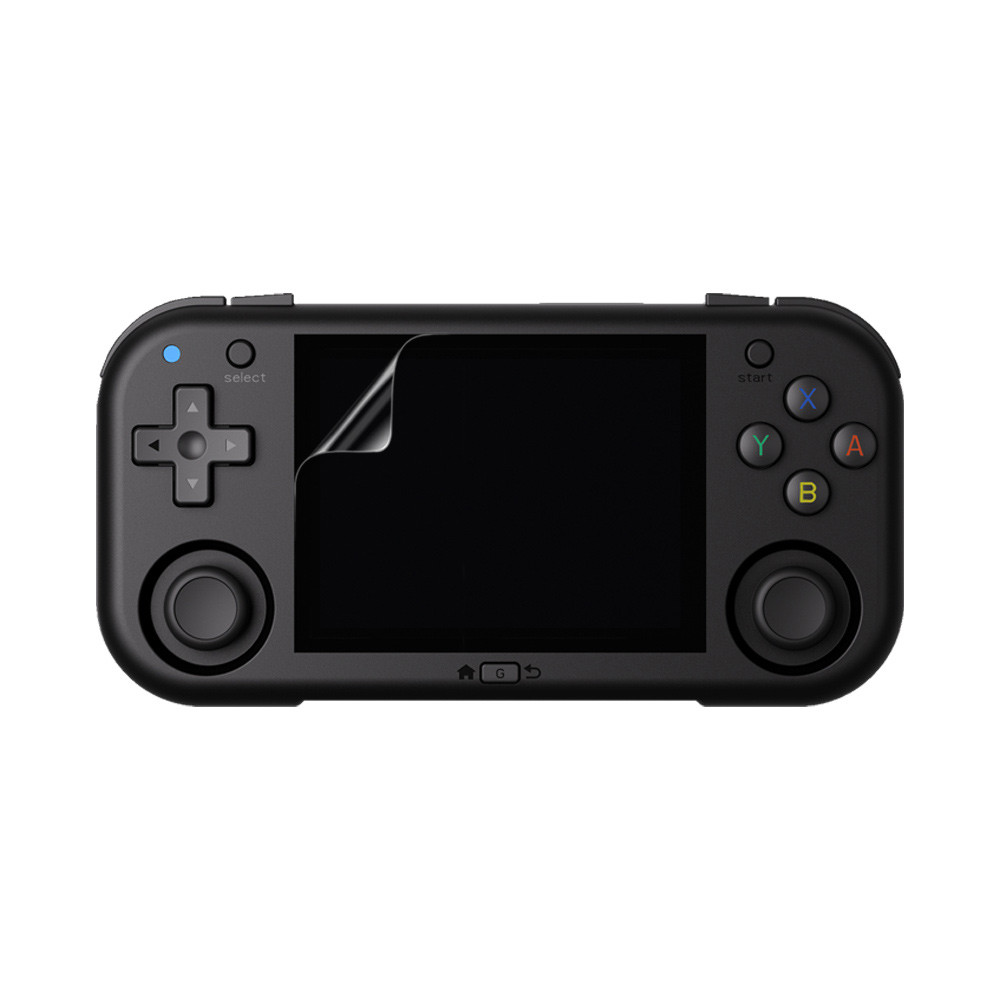
Button placement also deserves attention. The directional pad, face buttons, shoulder buttons, and analog controls—if included depending on configuration—are positioned to reduce hand fatigue. Comfortable ergonomics become increasingly important during extended gameplay, especially for RPGs or platformers that require precise controls.
Another positive aspect is the textured finish found on many versions of the handheld. This improves grip while reducing fingerprints, giving the device a cleaner appearance after hours of use. Even small design choices like rounded edges contribute to a better overall user experience.
The console also includes thoughtfully positioned ports for charging, storage expansion, headphones, and data transfer. These ports are placed where cables won’t interfere with gameplay, making charging while playing much more convenient than on some competing devices.
Although compact, the MagicX Mini Zero 28 V2 manages to avoid feeling cramped. Players with average-sized hands generally find it comfortable, while younger gamers appreciate its lightweight construction that reduces wrist strain during long sessions.
Display Quality and Visual Experience
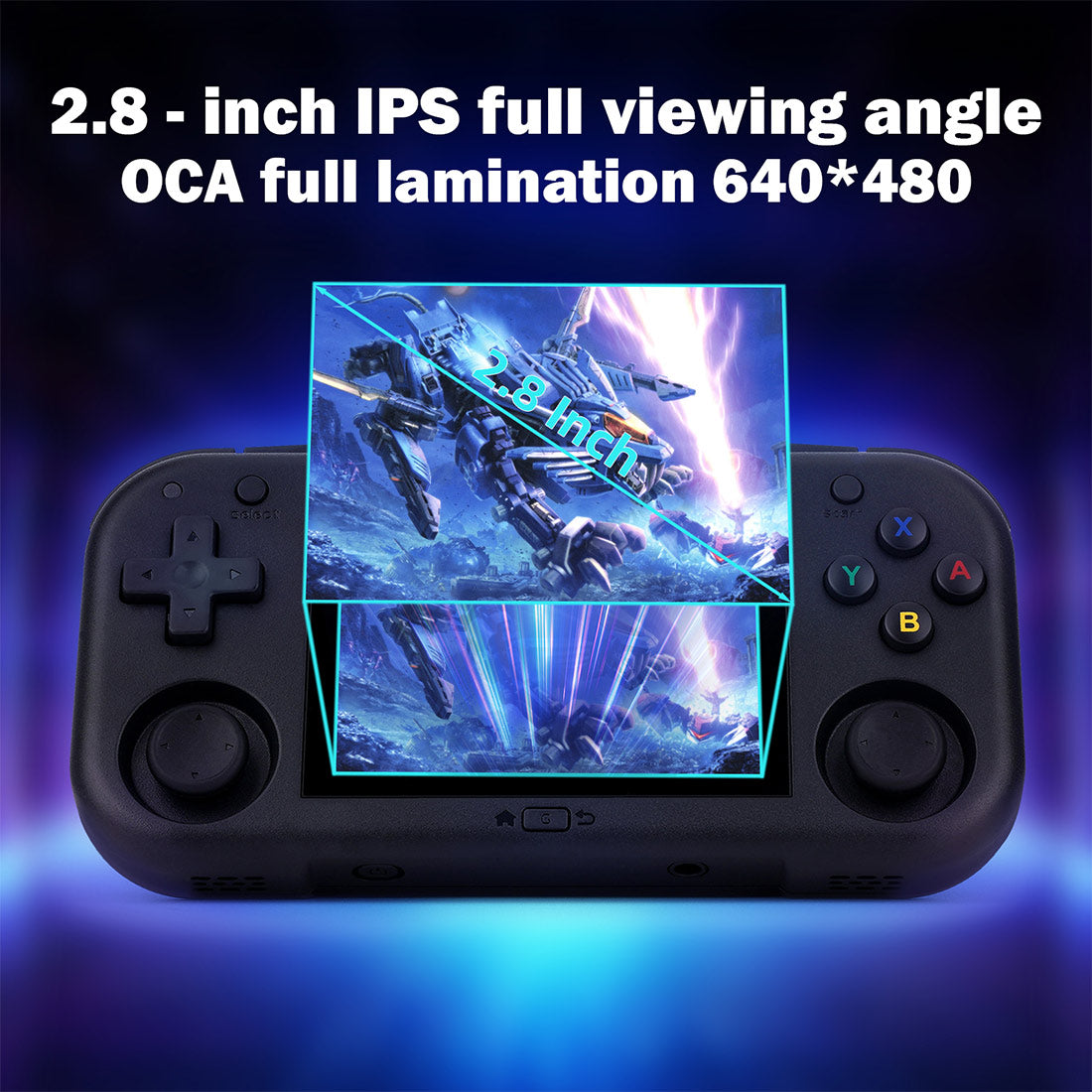
A gaming handheld is only as enjoyable as its screen, and the MagicX Mini Zero 28 V2 performs well in this area. The display offers sharp visuals that help classic pixel-art games look vibrant while preserving their original charm. Retro graphics often benefit from modern screens because colors appear cleaner and more consistent than they did on older hardware.
Brightness levels are another strong point. Indoor visibility is excellent, allowing players to comfortably enjoy games without constantly adjusting settings. While direct sunlight can still affect visibility, the display performs well enough for travel, commuting, or casual outdoor gaming.
Viewing angles are also impressive for a handheld in this category. Colors remain stable when looking at the screen from different positions, making multiplayer viewing or casual demonstrations easier without noticeable color distortion.
Pixel density contributes to a crisp presentation that enhances classic games without making them appear artificially sharp. Many retro enthusiasts actually prefer displays that maintain the original artistic intent while eliminating the blur commonly associated with older LCD panels.
The screen size strikes a practical balance between portability and playability. Larger displays improve immersion but reduce portability, while smaller screens maximize portability but may strain the eyes. The MagicX Mini Zero 28 V2 finds a comfortable middle ground suitable for extended gaming sessions.
Software options often include adjustable scaling filters, aspect ratio controls, and visual enhancements. These features let players customize how classic games appear, whether they prefer authentic pixel-perfect rendering or smoother upscaled graphics.
Hardware Specifications and Processing Power
The hardware inside the MagicX Mini Zero 28 V2 is designed specifically for retro gaming rather than demanding modern titles. Instead of chasing maximum raw power, the system focuses on delivering consistent performance across supported emulators while maintaining battery efficiency.
Its processor handles a wide variety of classic gaming systems with impressive stability. Games launch quickly, menus remain responsive, and emulator navigation feels smooth throughout everyday use. This responsiveness contributes significantly to the overall user experience because even simple actions feel polished.
Memory capacity also plays an important role. Adequate RAM allows multiple emulator functions to operate efficiently, including save states, quick loading, menu transitions, and background services. Players spend less time waiting and more time enjoying their games.
Storage flexibility is another advantage. Most users rely on expandable storage cards to build extensive retro game libraries. Since classic games generally occupy relatively little space compared to modern releases, even moderate storage capacities can hold thousands of titles from multiple gaming systems.
Thermal management is surprisingly effective for such a compact handheld. Efficient hardware produces less heat during long gaming sessions, improving comfort while reducing the likelihood of thermal throttling that could negatively affect performance.
Energy-efficient components also help maximize battery life. Instead of prioritizing benchmark scores, the internal hardware aims to balance performance with long-lasting portable gameplay, making the console more practical for everyday use.
Overall, the hardware reflects careful engineering decisions focused on the needs of retro gamers rather than unnecessary specifications that would increase price without providing meaningful benefits.
Software and User Interface
The software experience often determines whether a handheld feels enjoyable or frustrating, and the MagicX Mini Zero 28 V2 provides an interface designed with accessibility in mind. Even users unfamiliar with emulator-based gaming can navigate the menus after only a few minutes of exploration.
The home screen organizes games logically, making it easy to browse different gaming systems without searching through complicated folder structures. Clean menus help users spend more time playing instead of configuring software.
Customization options add another layer of appeal. Players can often modify themes, menu layouts, artwork, and display settings to create a personalized interface that reflects their gaming preferences. These visual improvements help the handheld feel unique rather than generic.
Save states significantly improve convenience. Unlike original gaming hardware that required players to reach designated save points, modern emulation allows users to save progress almost anywhere. This feature is especially valuable during travel when gaming sessions may be interrupted unexpectedly.
Fast-forward functions are another welcome addition. Older RPGs and strategy games sometimes include lengthy animations or repetitive battles. Being able to accelerate gameplay saves time while maintaining the overall experience.
The software also supports regular firmware improvements that address bugs, improve emulator compatibility, enhance battery optimization, and introduce new features. Active software development extends the lifespan of the MagicX Mini Zero 28 V2 well beyond its initial release.
Gaming Performance Across Popular Retro Systems
The true purpose of the MagicX Mini Zero 28 V2 is delivering an enjoyable retro gaming experience, and this is where the handheld earns much of its positive reputation. Performance varies depending on the console being emulated, but most classic systems run exceptionally well with little need for manual adjustments.
Earlier gaming generations are handled effortlessly. These systems require relatively modest processing power, allowing games to run at full speed with stable frame rates and responsive controls. Players can enjoy platformers, puzzle games, action titles, and adventure classics without noticeable slowdowns.
As emulation moves into newer console generations, hardware demands naturally increase. Even so, the MagicX Mini Zero 28 V2 manages many popular systems with impressive consistency when appropriate emulator settings are used. Community-created optimization guides further improve compatibility for demanding games.
Audio synchronization remains reliable throughout gameplay, an important but often overlooked aspect of emulation. Smooth sound effects and properly timed music contribute significantly to preserving the authentic feeling of classic games.
Input latency is also minimal. Responsive controls are essential for genres such as fighting games, rhythm games, and fast-paced platformers where precise timing determines success. The handheld’s responsive button inputs help recreate the feel of original gaming hardware.
Overall, the gaming experience emphasizes stability over unrealistic expectations. Rather than attempting to emulate every console perfectly, the MagicX Mini Zero 28 V2 performs exceptionally well within its intended range, making it an excellent option for retro gaming enthusiasts.
Battery Life and Charging Performance
Battery life is one of the most important factors when choosing a portable gaming device, and the MagicX Mini Zero 28 V2 delivers a satisfying balance between performance and efficiency. Since the handheld is designed primarily for retro gaming rather than graphically demanding modern titles, it can provide several hours of uninterrupted gameplay on a single charge. For most users, this is more than enough for daily commutes, travel, or relaxing at home.
Actual battery performance depends on several factors. Screen brightness, speaker volume, Wi-Fi usage (if available), emulator settings, and the console being emulated all affect how quickly the battery drains. Playing simple 8-bit or 16-bit games generally consumes less power than running more demanding PlayStation or Nintendo 64 emulators. Even so, the difference is usually manageable, allowing users to enjoy extended gaming sessions without constantly searching for a charger.
Charging is straightforward and convenient. Most owners appreciate the ability to recharge using common USB power adapters or portable power banks. This flexibility makes the MagicX Mini Zero 28 V2 especially practical for travelers who may not always have access to a wall outlet. Many gamers keep a small power bank in their backpack, effectively extending gaming time throughout the day.
The charging speed is also reasonable. While it may not compete with flagship smartphones that support ultra-fast charging, it replenishes the battery quickly enough to minimize downtime. Taking short charging breaks between gaming sessions is often enough to keep the handheld ready for hours of additional play.
Battery longevity is another positive aspect. Modern rechargeable batteries are designed to handle hundreds of charging cycles before showing noticeable capacity loss. With proper care—such as avoiding extreme temperatures and using reliable chargers—the battery should continue performing well for years of regular gaming.
Overall, the MagicX Mini Zero 28 V2 offers dependable battery performance that complements its portable nature. Instead of constantly worrying about battery percentages, users can focus on enjoying their favorite retro games wherever they go.
Controls and Gaming Comfort
Excellent hardware specifications mean little if the controls feel uncomfortable, which is why the MagicX Mini Zero 28 V2 places significant emphasis on ergonomics. From the moment users pick up the device, it becomes clear that comfort was considered throughout the design process.
The directional pad provides precise movement that works especially well for classic platformers, fighting games, puzzle titles, and role-playing games. Retro gamers often judge handheld quality by the feel of its D-pad because many older games rely almost entirely on directional accuracy. Fortunately, the MagicX Mini Zero 28 V2 delivers responsive inputs with minimal accidental diagonal presses.
The face buttons offer satisfying feedback without requiring excessive pressure. Their travel distance feels balanced, allowing rapid button presses while reducing finger fatigue during longer gaming sessions. This responsiveness is particularly noticeable in action games where split-second reactions matter.
Shoulder buttons are positioned naturally along the top edge of the device. Although compact handhelds sometimes sacrifice shoulder button comfort due to limited space, the MagicX Mini Zero 28 V2 manages to keep them easily accessible. Racing games, shooters, and PlayStation titles benefit from this thoughtful placement.
Long gaming sessions remain surprisingly comfortable thanks to the console’s lightweight construction. Even after several hours of gameplay, hand strain remains minimal for most users. Rounded edges prevent uncomfortable pressure points that can develop on devices with sharper designs.
Button durability also inspires confidence. Frequent gaming places constant stress on input components, so reliable switches are essential. Users generally appreciate consistent responsiveness over time without noticeable degradation after months of regular use.
Ultimately, the controls contribute significantly to the handheld’s overall appeal. Smooth inputs, comfortable ergonomics, and dependable button quality help recreate the enjoyable experience of classic gaming while taking advantage of modern hardware improvements.
Audio Quality and Multimedia Experience
Although visuals often receive the most attention, sound plays an equally important role in creating an immersive gaming experience. The MagicX Mini Zero 28 V2 delivers surprisingly capable audio considering its compact size.
Built-in speakers produce clear sound with enough volume for personal gaming sessions. Classic game soundtracks, which often rely on memorable melodies and simple sound effects, remain enjoyable and well-balanced. Dialogue, background music, and gameplay effects are reproduced cleanly without excessive distortion at moderate volume levels.
Using headphones further enhances the experience. Wired headphones provide greater detail, deeper bass, and improved stereo separation, making classic games even more immersive. Many players prefer headphones during travel because they eliminate outside distractions while preventing noise from disturbing others.
Audio latency is also well managed. Sound effects occur precisely when actions happen on-screen, preserving gameplay responsiveness. This synchronization is particularly important in rhythm games, platformers, and fighting games where timing depends on both visual and audio cues.
The handheld also supports multimedia playback beyond gaming. Depending on the installed software, users can often play music, watch videos, or view images directly from their storage card. While these features are not the primary focus of the device, they increase its versatility as a portable entertainment system.
Menu sounds and navigation effects remain subtle rather than distracting. Simple interface audio provides useful feedback without overwhelming the user experience, contributing to the polished feel of the operating system.
Overall, the MagicX Mini Zero 28 V2 delivers audio quality that complements its strong gaming performance. Whether using the built-in speakers or headphones, players can enjoy classic game soundtracks as they were intended.
Supported Gaming Systems
One of the strongest selling points of the MagicX Mini Zero 28 V2 is its broad emulator compatibility. Instead of purchasing multiple vintage consoles, users gain access to a wide collection of classic gaming platforms through one compact handheld.
Early gaming systems perform exceptionally well. These include many iconic home consoles and handheld devices that shaped gaming history. Their relatively modest hardware requirements allow games to run smoothly with accurate sound, responsive controls, and stable frame rates.
The device also handles many 16-bit and 32-bit gaming systems with excellent consistency. These generations introduced more advanced graphics, richer soundtracks, and deeper gameplay mechanics. The MagicX Mini Zero 28 V2 reproduces these experiences faithfully while benefiting from modern conveniences such as save states and customizable controls.
PlayStation-era gaming is another area where many users spend significant time. Numerous classic RPGs, racing games, platformers, and adventure titles remain highly enjoyable today. With proper emulator configuration, the handheld offers an impressive experience across a large portion of this library.
Some later-generation systems demand considerably more processing power. Performance naturally varies depending on individual games and emulator optimization. Fortunately, active community support provides recommended settings that help maximize compatibility for more demanding titles.
Arcade emulation is another highlight. Many players enjoy revisiting classic arcade cabinets through portable emulation, experiencing timeless beat ’em ups, shooters, puzzle games, and fighting games without requiring dedicated hardware.
The variety of supported platforms means users rarely run out of games to explore. Whether revisiting childhood memories or discovering retro classics for the first time, the MagicX Mini Zero 28 V2 provides access to decades of gaming history in one convenient package.
Setting Up the MagicX Mini Zero 28 V2
Getting started with the MagicX Mini Zero 28 V2 is a relatively simple process, even for users who have never owned an emulation handheld before. The interface is designed to reduce confusion while still providing plenty of customization options for advanced users.
The first step usually involves charging the battery completely before extended use. Beginning with a full battery helps ensure uninterrupted setup while also giving users an accurate understanding of normal battery performance during future gaming sessions.
Next comes configuring system preferences. Language selection, display brightness, volume levels, button mapping, and screen scaling are among the first settings many users adjust. These small changes create a more personalized gaming experience from the beginning.
Adding game files is another important step. Most users organize their collections by gaming system, making navigation much easier later. A well-organized library allows players to locate favorite games quickly without scrolling through hundreds of unrelated titles.
Many owners also choose to update the firmware shortly after receiving the handheld. Firmware updates often improve emulator compatibility, fix software bugs, enhance stability, and introduce useful new features. Keeping the software current ensures the best possible experience.
Testing several games from different systems helps confirm everything is functioning correctly. If any compatibility issues appear, users can adjust emulator settings or consult community recommendations for optimal configurations.
Once setup is complete, everyday use becomes extremely straightforward. The intuitive interface allows players to jump into games within seconds, making the MagicX Mini Zero 28 V2 enjoyable even for casual gamers who prefer simplicity over constant customization.
Custom Firmware and Community Support
A major advantage of the MagicX Mini Zero 28 V2 is the enthusiastic community that surrounds it. Unlike closed gaming ecosystems that rely entirely on official updates, retro handheld communities actively develop custom firmware, themes, performance improvements, and compatibility enhancements.
Custom firmware often introduces features unavailable in the original software. These may include improved menu systems, additional emulator options, enhanced performance profiles, expanded customization settings, and bug fixes discovered by experienced developers. Many users consider custom firmware one of the best ways to unlock the handheld’s full potential.
Community-created themes also allow owners to personalize the appearance of the interface. Different visual styles, icons, backgrounds, fonts, and animations give the device a unique identity while making menu navigation more enjoyable.
Online guides simplify advanced customization for beginners. Step-by-step tutorials explain firmware installation, storage organization, emulator optimization, controller configuration, and troubleshooting. Even users with limited technical experience can successfully improve their handheld by following clear instructions.
Forums and social media groups remain valuable resources whenever questions arise. Experienced owners regularly help newcomers solve problems, recommend emulator settings, and share useful discoveries. This collaborative environment creates a welcoming community where knowledge continues expanding over time.
Game compatibility lists also benefit from community involvement. Players report which titles perform well, identify games requiring special settings, and suggest emulator configurations that improve performance. These shared experiences help new owners avoid unnecessary trial and error.
The continued enthusiasm of the retro gaming community ensures that the MagicX Mini Zero 28 V2 remains relevant long after its initial release. Ongoing software improvements and shared expertise add lasting value that extends well beyond the hardware itself.
Performance Compared to Similar Handhelds
Choosing a retro gaming handheld often involves comparing multiple devices with similar prices and capabilities. The MagicX Mini Zero 28 V2 competes in a crowded market, yet it distinguishes itself through a balanced combination of portability, software flexibility, and dependable gaming performance.
Some competing handhelds prioritize raw processing power. While stronger hardware may improve performance in certain demanding emulators, it often increases cost, battery consumption, and device size. The MagicX Mini Zero 28 V2 instead focuses on delivering reliable performance for the gaming systems most retro enthusiasts actually play.
Other devices emphasize premium materials or luxury design. Although these models may look impressive, they sometimes sacrifice affordability. The MagicX Mini Zero 28 V2 provides solid construction without pushing the price beyond the reach of average gamers, making it attractive to both beginners and experienced collectors.
Software stability is another area where balanced design matters. Some handhelds launch with unfinished operating systems that require frequent troubleshooting. By contrast, the MagicX Mini Zero 28 V2 benefits from a mature software ecosystem supported by both official updates and an active enthusiast community.
Portability remains one of its biggest strengths. Larger handhelds may offer bigger displays, but they are less convenient to carry daily. The compact design of the MagicX Mini Zero 28 V2 encourages spontaneous gaming sessions during travel, lunch breaks, or commuting.
Value for money is perhaps its greatest advantage. Buyers receive a capable retro gaming device that performs well across a broad range of classic systems without paying premium prices associated with high-end portable gaming PCs.
Rather than attempting to outperform every competitor in every category, the MagicX Mini Zero 28 V2 succeeds by delivering a well-rounded experience. This balanced approach explains why it continues attracting positive attention within the retro gaming community.
Advanced Emulator Settings for Better Performance
Although the MagicX Mini Zero 28 V2 performs well with its default settings, users who spend time learning the available emulator options can often achieve an even better gaming experience. The built-in emulator menus provide access to numerous performance adjustments that allow players to balance visual quality, compatibility, and battery life according to their personal preferences.
One of the most commonly adjusted settings is the graphics renderer. Some games perform better with one rendering method than another, and experimenting with these options can eliminate minor graphical glitches or improve frame stability. Fortunately, most players will only need to make these changes once, as emulator settings are usually remembered for each gaming system.
Frame skipping is another useful option when playing more demanding titles. While it is generally best to leave frame skipping disabled for systems that already run smoothly, enabling it for particularly challenging games can improve responsiveness. The goal is not simply to increase frame rates but to maintain consistent gameplay without noticeable interruptions.
Resolution scaling also deserves attention. Classic games were originally designed for lower-resolution displays, so increasing internal rendering resolution may improve image clarity on certain systems. However, higher resolutions also require more processing power, meaning users should find a balance that suits both performance and visual quality.
Shader support allows players to recreate the appearance of classic CRT televisions or handheld LCD screens. These visual filters can soften sharp pixels, add scanlines, or reproduce the authentic look of vintage displays. Some players enjoy the nostalgic appearance, while others prefer crisp pixel-perfect graphics. The flexibility to choose either style is one of the advantages of modern emulation.
Controller customization is equally important. Players can remap buttons to better match personal preferences or replicate the layouts of original gaming hardware. This feature is especially helpful when switching between different gaming systems, each of which may have unique controller designs.
Save states and rewind functionality further improve convenience. Instead of repeating difficult sections after every mistake, players can instantly return to previous moments. While these features differ from the original console experience, they make classic games much more accessible for modern audiences.
Overall, learning the advanced emulator settings allows owners of the MagicX Mini Zero 28 V2 to tailor the handheld to their exact preferences. Small adjustments can produce meaningful improvements in both gameplay comfort and overall performance.
Managing Storage and Game Libraries
A well-organized game library greatly improves the daily experience of using the MagicX Mini Zero 28 V2. Since retro game collections can grow rapidly, taking time to organize files properly makes navigation much faster and more enjoyable.
Most users choose to separate games into folders based on their original gaming system. This simple structure keeps collections tidy while allowing emulator software to detect games automatically. Organized storage also reduces the likelihood of duplicate files or misplaced ROMs.
Using high-quality microSD cards is another important consideration. Reliable storage minimizes loading delays while reducing the risk of data corruption. Because retro handhelds rely heavily on removable storage, investing in a dependable memory card contributes directly to long-term reliability.
Backing up save files should become a regular habit. Hours of gameplay can be lost if storage becomes damaged or files are accidentally deleted. Copying save files to a computer or another storage device provides peace of mind and protects valuable progress.
Artwork and metadata can also enhance the browsing experience. Many front-end interfaces automatically display game covers, descriptions, release dates, and screenshots, transforming a simple file browser into an attractive digital game library. Although downloading artwork requires additional setup, many users find the improved presentation worthwhile.
Removing duplicate or unused games keeps menus clean and manageable. Thousands of games may sound impressive, but a carefully selected collection often creates a better experience than an overwhelming library filled with titles that will never be played.
Storage management extends beyond games themselves. Firmware updates, themes, screenshots, save states, and multimedia files also consume space over time. Occasionally reviewing storage usage helps ensure the handheld continues operating smoothly without unexpected limitations.
With thoughtful organization and regular backups, the MagicX Mini Zero 28 V2 can store an impressive collection of classic games while remaining easy to navigate and enjoyable to use.
Maintenance and Long-Term Care
Like any portable electronic device, the MagicX Mini Zero 28 V2 benefits from regular maintenance. Proper care not only preserves its appearance but also helps ensure reliable performance for years of gaming.
Keeping the screen clean is one of the simplest maintenance tasks. Dust, fingerprints, and smudges gradually accumulate during everyday use. A soft microfiber cloth safely removes these marks without scratching the display, maintaining clear visibility during gameplay.
The exterior shell should also be cleaned periodically. Dirt and oils from normal handling can build up around buttons and textured surfaces. Gentle cleaning with a slightly damp cloth helps preserve the handheld’s appearance while preventing debris from entering small openings.
Storage cards deserve careful handling as well. Removing a microSD card while the device is writing data may result in file corruption. Always shutting down the system before removing storage reduces the risk of losing save files or damaging important software.
Battery care plays an important role in long-term performance. While modern lithium batteries require relatively little maintenance, avoiding extreme heat and prolonged storage at either completely full or completely empty charge levels can help extend battery lifespan.
Protective carrying cases provide another worthwhile investment. Because handheld consoles frequently travel in backpacks or pockets, cases help prevent scratches, accidental button presses, and screen damage during transportation.
Firmware updates should be installed whenever stable versions become available. Developers often release improvements that increase compatibility, fix software issues, optimize battery efficiency, and enhance overall stability.
Routine maintenance requires very little effort, yet it significantly contributes to the longevity of the MagicX Mini Zero 28 V2. A few minutes of occasional care can help keep the handheld performing like new for a long time.
Common Issues and Practical Solutions
Even well-designed handheld consoles occasionally experience minor problems, and the MagicX Mini Zero 28 V2 is no exception. Fortunately, most common issues have straightforward solutions that users can resolve without specialized technical knowledge.
If a game refuses to launch, the first step is usually confirming emulator compatibility. Some titles require specific emulator versions or configuration settings. Updating the firmware or trying an alternative emulator often resolves compatibility problems.
Occasional audio glitches may appear in particularly demanding games. Lowering audio latency settings or adjusting emulator synchronization options typically restores smooth sound playback. Community forums also provide optimized settings for many popular titles.
Slow performance usually relates to emulator configuration rather than hardware failure. Reducing graphical enhancements, disabling unnecessary filters, or lowering internal rendering resolution often improves frame rates immediately.
Storage-related errors commonly result from improperly formatted memory cards or damaged files. Reformatting the storage card after backing up important data frequently solves persistent loading problems. Using reputable storage brands also minimizes future reliability concerns.
Button responsiveness may occasionally seem inconsistent if dust accumulates around the controls. Gentle cleaning generally restores normal operation without requiring hardware repairs.
Battery concerns are another common topic among new owners. Shorter-than-expected battery life often results from maximum brightness settings, continuous Wi-Fi usage, or demanding emulator configurations. Lowering brightness and closing unused background services usually extends playtime noticeably.
Software freezes occasionally occur following interrupted firmware updates or incompatible modifications. Reinstalling official firmware generally restores stable operation while preserving the handheld’s overall functionality.
Most importantly, active community support means users rarely face problems alone. Detailed troubleshooting guides, discussion forums, and experienced enthusiasts provide solutions for nearly every issue that owners are likely to encounter.
Is the MagicX Mini Zero 28 V2 Worth Buying?
For anyone interested in portable retro gaming, the MagicX Mini Zero 28 V2 represents an appealing combination of affordability, portability, and reliable performance. Rather than attempting to compete directly with expensive handheld gaming PCs, it focuses on delivering an enjoyable experience for classic games, and it succeeds remarkably well within that goal.
Its compact size makes it easy to carry every day, encouraging spontaneous gaming sessions whenever free time becomes available. Whether traveling, commuting, or relaxing at home, the handheld fits naturally into everyday life without becoming inconvenient to transport.
Performance across classic gaming systems remains one of its strongest advantages. Most retro platforms run smoothly with responsive controls, attractive visuals, and dependable audio synchronization. Combined with save states, fast-forward functions, and customizable settings, the overall experience often surpasses that of the original hardware.
The active community surrounding the device adds long-term value beyond the hardware itself. Continued firmware improvements, community-developed themes, compatibility updates, and optimization guides ensure that the MagicX Mini Zero 28 V2 continues improving long after purchase.
No handheld is perfect, and users seeking flawless emulation of every modern system may need significantly more powerful—and more expensive—hardware. However, those expectations fall outside the intended purpose of this device. Evaluated within its target market, the MagicX Mini Zero 28 V2 delivers excellent value.
For beginners entering the world of retro handheld gaming, it offers an approachable learning experience. Experienced enthusiasts also appreciate its customization options, portable design, and dependable performance across a wide range of classic gaming systems.
Ultimately, the MagicX Mini Zero 28 V2 earns its positive reputation by focusing on what matters most: making retro gaming accessible, enjoyable, portable, and affordable. For many players, that balance makes it one of the most satisfying handhelds in its category.
Pros and Cons of the MagicX Mini Zero 28 V2
Every handheld gaming console has its strengths and limitations, and the MagicX Mini Zero 28 V2 is no different. Understanding both sides helps buyers set realistic expectations before making a purchase.
One of the biggest advantages is its portability. The handheld is small enough to fit comfortably into a pocket or small bag, making it easy to carry during travel, commuting, or vacations. Unlike larger handheld gaming devices, it doesn’t feel bulky, which encourages users to take it almost everywhere.
Performance is another major strength. The MagicX Mini Zero 28 V2 handles a wide range of retro gaming systems smoothly, offering responsive controls and stable gameplay across most supported platforms. For classic gaming enthusiasts, this level of performance is more than enough to enjoy thousands of timeless titles.
Battery life also deserves praise. Since the hardware focuses on efficiency rather than extreme processing power, players can enjoy several hours of gaming before needing to recharge. Combined with USB charging support, the handheld is well suited for portable entertainment.
The active community surrounding the device is another significant benefit. Owners regularly create firmware updates, custom themes, emulator improvements, and optimization guides. This ongoing support extends the lifespan of the handheld far beyond its original release.
On the other hand, buyers should remember that the MagicX Mini Zero 28 V2 is designed primarily for retro gaming. Users expecting flawless performance on newer console generations may find its limitations noticeable. While many demanding systems are partially playable, performance naturally varies depending on the game.
The compact size, although excellent for portability, may also feel slightly cramped for users with very large hands during extended gaming sessions. Fortunately, many owners adapt quickly after spending some time with the device.
Overall, the strengths greatly outweigh the limitations, especially for gamers whose primary interest lies in classic console libraries rather than modern AAA gaming.
Who Should Buy the MagicX Mini Zero 28 V2?
The MagicX Mini Zero 28 V2 is an excellent choice for several different types of gamers. Whether you’re completely new to retro gaming or have been collecting classic consoles for years, the handheld offers something valuable.
First-time retro gamers will appreciate how approachable the device is. The interface is easy to navigate, setup is straightforward, and there are plenty of online guides available if questions arise. Instead of dealing with aging original hardware, players can enjoy classic games from one compact device.
Collectors also benefit from owning the MagicX Mini Zero 28 V2. Many collectors prefer preserving their original consoles while using handheld emulators for everyday gaming. This reduces wear on vintage hardware while keeping classic titles easily accessible.
Frequent travelers represent another ideal audience. Long flights, train rides, bus journeys, or hotel stays become much more enjoyable when hundreds or even thousands of retro games are available in a pocket-sized handheld.
Busy adults who have limited gaming time often enjoy the convenience of save states. Being able to pause progress almost instantly makes retro gaming fit much more naturally into modern lifestyles.
Parents may also find the handheld appealing. Many classic games remain family-friendly today, allowing children to experience gaming history while parents revisit childhood favorites. Sharing older games across generations often creates enjoyable family moments.
Finally, hobbyists who enjoy customizing their electronics will appreciate the active development community. Installing custom firmware, experimenting with themes, and optimizing emulator settings can become an enjoyable hobby in itself.
Tips to Get the Best Experience
Owning the MagicX Mini Zero 28 V2 becomes even more rewarding when users follow a few simple best practices. Small adjustments can noticeably improve both performance and convenience.
Always keep the firmware updated whenever stable releases become available. Software improvements often increase compatibility, improve battery efficiency, fix bugs, and introduce useful features without requiring new hardware.
Using a reliable microSD card is equally important. Storage quality affects loading speed, file reliability, and overall stability. Investing in a reputable memory card helps avoid unnecessary problems later.
Take time to organize your game collection. Sorting games by console, genre, or personal favorites makes navigation much faster than browsing thousands of randomly placed files.
Experiment with emulator settings one system at a time. Rather than changing multiple options simultaneously, make gradual adjustments until you find the balance between image quality and performance that best suits your preferences.
Create regular backups of save files. Losing dozens of hours of gameplay because of accidental file corruption is frustrating and entirely preventable with simple backups.
Consider using a protective carrying case. Portable devices naturally experience bumps and scratches during travel, and a case provides inexpensive protection against everyday wear.
Lastly, don’t hesitate to explore community forums and guides. Many experienced users have already discovered excellent settings for popular games, saving new owners considerable time and experimentation.
Future of the MagicX Mini Zero Series
The popularity of retro handheld gaming continues growing each year, and the MagicX Mini Zero series appears well positioned to benefit from this trend. Manufacturers increasingly recognize that players value portable devices capable of preserving gaming history while adding modern conveniences.
Future revisions may introduce faster processors, larger batteries, brighter displays, improved wireless connectivity, and even broader emulator compatibility. Hardware advancements typically become more affordable over time, allowing future handhelds to deliver greater performance without dramatically increasing prices.
Software development is likely to remain equally important. Community-created firmware continues improving long after devices launch, introducing features that were never part of the original release. The MagicX Mini Zero 28 V2 already benefits from this collaborative development model, and future updates may continue enhancing compatibility and usability.
Display technology will probably continue improving as well. Higher brightness, better color accuracy, reduced power consumption, and smoother refresh rates could further enhance the retro gaming experience while maintaining portability.
Battery technology also continues advancing. Longer play sessions combined with faster charging would make future handhelds even more practical for travel and everyday use.
Perhaps the most exciting aspect is the growing retro gaming community itself. As more players discover classic games through handheld emulation, community support becomes stronger, leading to better guides, firmware, themes, compatibility databases, and optimization techniques.
Even as newer models eventually arrive, the MagicX Mini Zero 28 V2 is likely to remain a respected handheld thanks to its balanced design and dedicated user community.
Final Verdict
The MagicX Mini Zero 28 V2 successfully delivers what many retro gamers actually want: a portable, reliable, affordable handheld capable of playing an impressive collection of classic games without unnecessary complexity.
Its compact design makes daily portability effortless, while its comfortable controls encourage long gaming sessions. Combined with dependable battery life, responsive software, and broad emulator compatibility, the overall package feels thoughtfully designed rather than simply assembled around specifications.
Community support significantly increases its value. Custom firmware, optimization guides, performance improvements, and active discussion forums ensure that the handheld continues evolving long after purchase. Few gaming devices benefit from such enthusiastic long-term support.
Although it naturally has hardware limitations compared to expensive premium handhelds, expecting flagship-level performance from a compact retro console would be unrealistic. Evaluated within its intended category, the MagicX Mini Zero 28 V2 performs exceptionally well and offers excellent value for money.
Whether you’re rediscovering childhood classics, exploring legendary games for the first time, or simply looking for a dependable travel companion, this handheld deserves serious consideration. Its balanced combination of affordability, portability, customization, and gaming performance explains why it continues attracting attention from retro gaming enthusiasts worldwide.
Conclusion
The MagicX Mini Zero 28 V2 demonstrates how far portable retro gaming has progressed. Instead of requiring multiple vintage consoles, complicated hardware modifications, or large collections of aging cartridges, players can enjoy decades of gaming history from one compact handheld.
Its thoughtful design, reliable controls, quality display, respectable battery life, flexible software, and strong community support combine to create a satisfying user experience. While no handheld can perfectly emulate every gaming system ever created, the MagicX Mini Zero 28 V2 focuses on doing the essentials extremely well.
For anyone seeking an enjoyable retro gaming companion that balances performance, portability, and affordability, the MagicX Mini Zero 28 V2 remains one of the most compelling options currently available. It captures the spirit of classic gaming while embracing the convenience of modern technology, making it a worthwhile investment for both newcomers and experienced retro enthusiasts.
FAQs
What is the MagicX Mini Zero 28 V2?
It is a portable retro gaming handheld designed to emulate multiple classic gaming systems.
Is the MagicX Mini Zero 28 V2 good for beginners?
Yes, its simple interface and easy setup make it beginner-friendly.
Can the MagicX Mini Zero 28 V2 emulate PlayStation games?
Yes, it supports many PlayStation titles with good performance.
Does the MagicX Mini Zero 28 V2 support save states?
Yes, save states are supported in most compatible emulators.
Can I install custom firmware on the MagicX Mini Zero 28 V2?
Yes, community-developed custom firmware is available for additional features.
Is expandable storage supported?
Yes, the handheld supports microSD cards for expanding game storage.
How long does the battery last?
Battery life varies by usage but generally provides several hours of gameplay.
Can I use headphones with the MagicX Mini Zero 28 V2?
Yes, compatible wired headphones can be used for private gaming.
Does it receive software updates?
Yes, firmware updates from both official and community sources are commonly available.
Is the MagicX Mini Zero 28 V2 worth buying?
Yes, it offers excellent value for retro gaming enthusiasts seeking portability and reliable performance.
Also read: Powkiddy X35H Review: A Complete Guide to Features, Performance, and Gaming Experience




Post Comment